Ace not working on Windows? Fixes for the microphone, hotkey, screen and sign-in
Use these steps for Black Label’s Ace AI assistant on Windows 11 and 10. Most problems trace back to four places: Windows’ microphone privacy switches, the Ctrl + Shift keys also switching keyboard layouts, windows that their own apps keep out of screen captures, and sign-in links that expire after 15 minutes. Choose the step that matches your symptom below.
Installing Ace for the first time? Use the Windows installation and Setup guide to check your PC and download Ace.

Free Play: 2,000 credits, no card. Ace by Black Label.
Ace can’t hear you
- Check the hardware first: a mute switch on the headset, or a muted microphone key on the keyboard.
- Open Settings > System > Sound. Under Input, choose the microphone you want, open its properties and select Start test while you speak.
- Open Settings > Privacy & security > Microphone and turn on Microphone access, Let apps access your microphone and Let desktop apps access your microphone. Ace is a desktop app, so the last switch is the one that covers it.
- Still nothing? In Settings > System > Sound, open Troubleshoot common sound problems and choose Input devices.
- If Windows doesn’t detect the microphone at all, uninstall the device in Device Manager under Sound, video and game controllers, restart, and let Windows reinstall the driver.
On Windows 10 the privacy switches are under Settings > Privacy > Microphone, and the desktop-apps switch is called Allow desktop apps to access your microphone.
Holding Ctrl + Shift does nothing, or changes your keyboard
Windows has its own use for those keys: when more than one keyboard layout is installed, Ctrl + Shift switches between them. If your typing comes out in another layout after you use Ace’s hotkey, that is the reason.
- If you don’t need the extra layout, remove it: Settings > Time & language > Language & region, then the language’s Language options, then the layout’s menu under Keyboards and Remove.
- If you need several layouts, switch between them with Windows key + Space instead.
- Hold both keys for the whole time you are speaking, and let go when you finish.
- If the hotkey has stopped responding, quit and reopen Ace.
A window looks blank or missing to Ace
Some apps deliberately keep their windows out of screen captures. You still see the window on your monitor, but Windows shows it blank, or leaves it out entirely, in anything captured, so Ace can’t see it either. Microsoft also lists protected video among things that can’t be recorded.
Check that Ace still has screen access, then ask again with the window you mean in front. For a window that blocks capture, copy the text you need somewhere else, or describe it to Ace.
Sign-in links and Setup
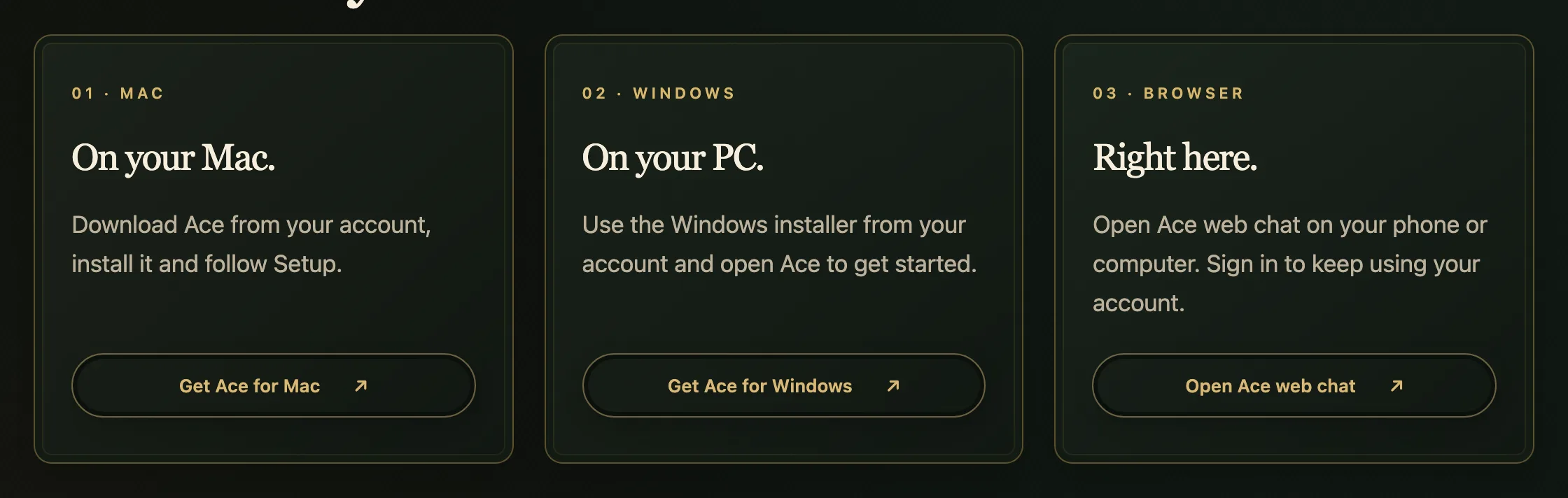
- An emailed sign-in link expires after 15 minutes; request a new one if yours is older.
- No email? Look in the spam folder, then request the link again, or choose Continue with Google instead.
- In Ace’s Setup, approve the same account you used on the website, so the app shows the balance you expect.
- If the link opens in a browser you don’t use, change your default browser under Settings > Apps > Default apps.
Ace doesn’t answer at all
Ace’s AI is hosted, so every answer needs an internet connection; check that the PC is online first. On Free Play, look at your credit balance in your account, since requests spend credits and voice and images use them too. On a work or school network, a firewall may block new apps, and the IT team can tell you.
Ace starts with Windows, or doesn’t
Windows lists the apps that start when you sign in under Settings > Apps > Startup, with a switch for each, and Task Manager’s Startup apps tab shows the same list. If Ace appears there, its switch decides whether it starts with Windows.
When to contact support
Write to hello@tryacee.com with your Windows version (Settings > System > About), the Ace build you have (check the Ace Windows release notes for the current signed installer), what you were doing and what you expected. A screenshot of any error helps, as long as it shows nothing private.
More from Ace
The full overview of Ace for Windows is on tryacee.com/windows-ai-assistant.
Also asked
Why does my keyboard layout change when I use Ace?
Windows uses Ctrl + Shift to switch keyboard layouts when more than one is installed. Remove the layout you don’t use, or switch layouts with Windows key + Space.
Why can’t Ace see one particular app?
That app may keep its window out of screen captures, which Windows allows. Ace sees it the way any capture would: blank or missing.
My sign-in link says it has expired. What now?
Request a new one from the sign-in page; each link lasts 15 minutes. Continue with Google avoids email links altogether.
Will reinstalling Ace fix it?
Sometimes, but try the specific fixes first. Most of these problems come from Windows settings that a reinstall doesn’t change.
How do I test my microphone in Windows before I try Ace again?
Open Settings > System > Sound, choose your microphone under Input, open its properties and select Start test while you speak. Check for a mute switch on the headset or a muted microphone key too. Then, in Settings > Privacy & security > Microphone, turn on Microphone access, Let apps access your microphone and Let desktop apps access your microphone; on Windows 10 that is Settings > Privacy > Microphone.
What if Windows doesn’t detect my microphone at all?
Uninstall the device in Device Manager under Sound, video and game controllers, restart, and let Windows reinstall the driver. Try the sound troubleshooter before that: in Settings > System > Sound, open Troubleshoot common sound problems and choose Input devices.
How do I get the Ctrl + Shift hotkey working again?
Quit and reopen Ace if the hotkey has stopped responding. When it works again, hold both keys for the whole time you are speaking, and let go when you finish. If your typing comes out in another layout afterwards, Windows is switching keyboard layouts with the same keys, which it does when more than one layout is installed.
Why does Ace give no answer when I ask a question?
Check three things. Ace’s AI is hosted, so every answer needs an internet connection; check that the PC is online first. On Free Play, look at your credit balance in your account, since requests spend credits and voice and images use them too. On a work or school network, a firewall may block new apps, and the IT team can tell you.
Can I stop Ace from starting every time I sign in to Windows?
Yes, if Ace is in the Startup list. Windows lists the apps that start when you sign in under Settings > Apps > Startup, with a switch for each, and Task Manager’s Startup apps tab shows the same list. If Ace appears there, its switch decides whether it starts with Windows.
What should I include when I email Ace support?
Write to hello@tryacee.com with your Windows version, which you can read under Settings > System > About, the Ace build you have, what you were doing and what you expected. A screenshot of any error helps, as long as it shows nothing private.
Where did my Ace sign-in email go?
Look in the spam folder first, then request the link again, or choose Continue with Google instead. An emailed sign-in link expires after 15 minutes, so request a new one if yours is older. If the link lands in a browser you don’t use, change your default browser under Settings > Apps > Default apps.
More questions
Deal yourself in.
More about Ace
Sources
- Keyboard shortcuts in Windows | Microsoft Support, Microsoft Support. Checked November 14, 2026.
- Configure Startup applications in Windows | Microsoft Support, Microsoft Support. Checked November 14, 2026.